Cisco Catalyst SD-WAN provides several methods to onboard both virtual and physical SD-WAN routers (cEdges) into the SD-WAN Manager and the SD-WAN fabric. In most deployments, Zero-Touch Provisioning (ZTP) is performed through Cisco’s Plug and Play (PnP) Connect service. This solution enables a cEdge with internet connectivity to automatically discover and connect to its assigned SD-WAN Validator as part of the onboarding process.
When a cEdge does not have direct internet-facing transport connectivity, the ZTP workflow falls back to alternative discovery mechanisms. In this process, the device attempts several methods, primarily through DHCP options, to locate its SD-WAN Validator and continue the onboarding procedure.
In the less common scenario where a cEdge has no internet-facing transport and DHCP is either unavailable or cannot be configured to provide the required options, a USB drive containing a bootstrap file can be used instead. In this article, I will explain how to bootstrap a cEdge running IOS-XE using this method and discuss the key considerations and intricacies involved.
Starting point
To start, you need some things.
- A working (on-premises) Cisco Catalyst SD-WAN cluster. I’ve tested this using version 20.15.5.
- A Cisco Catalyst SD-WAN router (cEdge) running IOS-XE in controller-mode. I’ve tested this with IOS-XE version 17.8.2.
- A USB-drive, with a single partition formatted in the FAT32-format.
The bare minimum
Depending on your use case, you may not need extensive bootstrap configuration. Let’s start with a simple example and build from there.
First, create a file named ciscosdwan.cfg and place it in the root directory of a USB drive. Then add the following configuration:
ciscosdwan.cfg‘.#cloud-config
vinitparam:
- org : rubenvankomen-org
- vbond : 192.168.1.2
- wanif : Cellular0/1/0In this example, we define the organization name, the SD-WAN validator (vBond) that the device should connect to, and the interface that should be used for that connection. Want to use multiple SD-WAN validators? No worries, configure a DNS-record/FQDN instead of an IP-address.
When the SD-WAN router boots with the USB drive containing the ciscosdwan.cfg file inserted, it bypasses the standard Plug and Play (PnP) discovery process and attempts to establish a connection directly to the specified SD-WAN validator (vBond) using the configured interface.
During boot, on the console of the router you can see this process happening by looking for the following loglines;
*Aug 12 13:50:42.005: %PNP-6-PNP_DISCOVERY_STOPPED: PnP Discovery stopped (Startup Config Present)
*Aug 12 13:50:47.657: %SDWAN_BOOTSTRAP-5-PROGRESS: R0/0: vip-confd-startup: Status: Loading day-0 user bootstrap config
*Aug 12 13:50:53.823: %SDWAN_BOOTSTRAP-5-BOOTSTRAP_CFG_LOAD_SUCCESS: R0/0: vip-confd-startup: Successfully extracted and committed config from /usbflash0/ciscosdwan.cfg
*Aug 12 13:53:00.234: %VDAEMON-5-CONTROL_CONN_STATE_CHANGE: R0/0: vdaemon: Control connection to vBond :: (TLOC: 192.168.1.2/12346/lte via lte) is UPIn the example, if the SD-WAN validator (running the ZTP role) is reachable, and the cEdge is on the list of allowed cEdges, it should show up the in the SD-WAN manager for claiming.
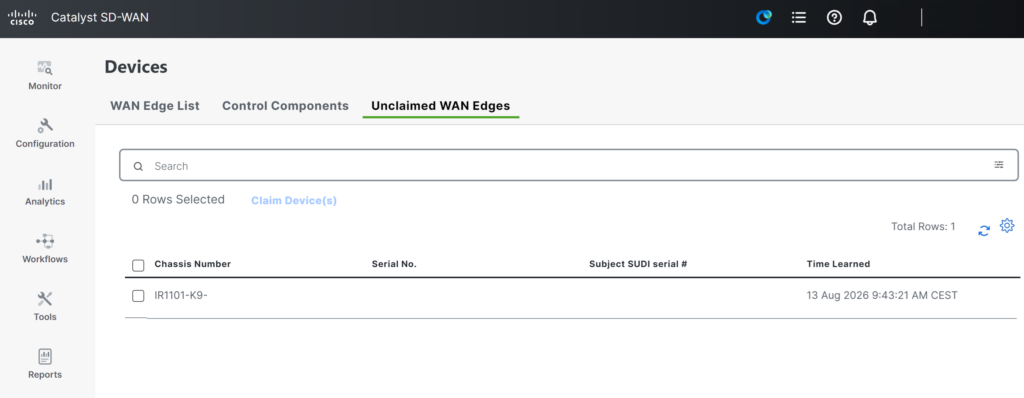
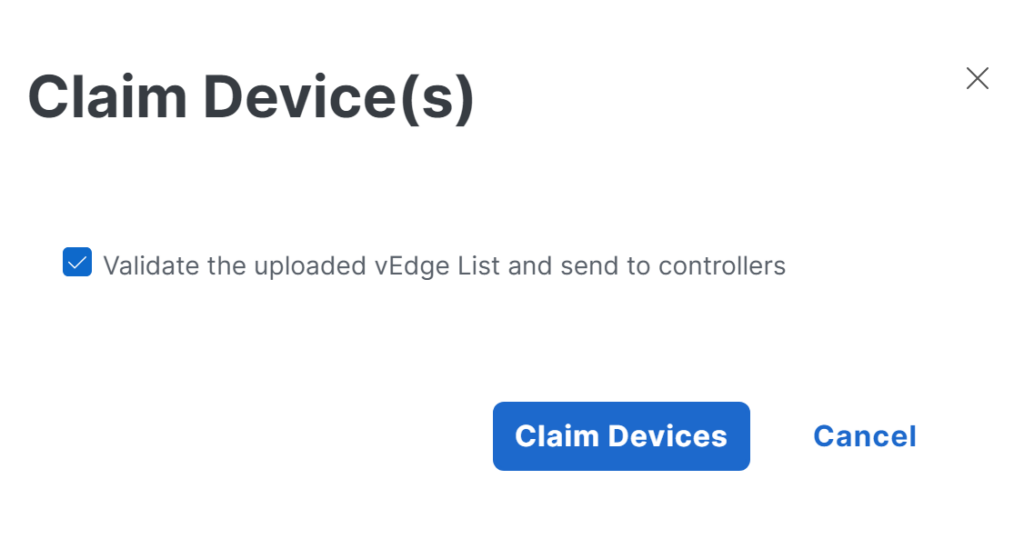
Now you’re cooking with gas!
In some scenarios, you may want to extend the functionality of the ciscosdwan.cfg file, and fortunately, this is possible! By using a specific configuration format, you can add additional settings to the ciscosdwan.cfg file that (for example) allows the cEdge to establish an Internet or MPLS connection, which may be required for the initial onboarding process.
To let the cEdge know where the ‘normal’ ZTP-configuration starts- and end, we need to encapsulate it, and let the cEdge know it is a file that contains multiple parts.
Content-Type: multipart/mixed; boundary="===============0123456789012345678=="
MIME-Version: 1.0
--===============0123456789012345678==
Content-Type: text/cloud-config; charset="us-ascii"
MIME-Version: 1.0
Content-Transfer-Encoding: 7bit
Content-Disposition: attachment; filename="tmpqdj2ziih"
#cloud-config
vinitparam:
 - org : rubenvankomen-org
 - vbond : 192.168.1.2
 - wanif : Cellular0/1/0
--===============0123456789012345678==--
The first line of the file indicates that the cEdge should interpret the file as a multipart configuration and defines the text string used as the section boundary. The beginning of each section is marked by the boundary string prefixed with --. To indicate the end of a section, the same boundary is used again. In the case of the final section, the boundary is both prefixed and suffixed with --, signaling the end of the multipart configuration file.
Now; lets also add section containing the interface and tunnel configuration.
Content-Type: multipart/mixed; boundary="===============0123456789012345678=="
MIME-Version: 1.0

--===============0123456789012345678==
Content-Type: text/cloud-config; charset="us-ascii"
MIME-Version: 1.0
Content-Transfer-Encoding: 7bit
Content-Disposition: attachment; filename="tmpqdj2ziih"

#cloud-config
vinitparam:
 - org : rubenvankomen-org
 - vbond : 192.168.1.2
 - wanif : Cellular0/1/0

--===============0123456789012345678==
Content-Type: text/cloud-boothook; charset="us-ascii"
MIME-Version: 1.0
Content-Transfer-Encoding: 7bit
Content-Disposition: attachment; filename="config.txt"

#cloud-boothook
  sdwan
   interface Cellular0/1/0
    tunnel-interface
     color private5
     encapsulation ipsec
    exit
   exit
  !
  interface Cellular0/1/0
   no shutdown
   ip address negotiated
   mtu 1500
  exit
 !
!
--===============0123456789012345678==--
In this example, the same multipart structure is used. The section boundary is defined below the cloud-config section, while the closing boundary is placed after the cEdge configuration section.
The configuration section can contain any command that can be entered through the cEdge console. In this example, the tunnel interface color is configured (the default color for cellular connections is LTE), and the cellular interface is configured to obtain its IP address automatically using negotiation.
This flexibility allows you to apply interface, routing, or connectivity-related settings that are required before the device can successfully establish connectivity and complete the SD-WAN onboarding process.
Troubleshooting
The ciscosdwan.cfg file can be quite complex, so it is not uncommon to encounter situations where troubleshooting is required.
File format and command errors
During testing, I encountered several errors caused by incorrect file formatting, such as improperly defined boundaries, and invalid configuration commands.
*Aug 12 11:51:28.173: %SDWAN_BOOTSTRAP-3-BOOTSTRAP_CFG_LOAD_FAILURE: R0/0: vip-confd-startup: Loading /usbflash0/ciscosdwan.cfg bootstrap failed, reason: Failed to extract config*Aug 12 11:32:57.462: %PARSER-4-BADCFG: Unexpected end of configuration file.To troubleshoot issues, manually execute the commands in the exact order they appear in the file. The commit output often provides valuable clues about the cause of the problem. If the commit succeeds, the issue is likely related to the file format rather than the configuration itself.
Generating ZTP-configuration on a cEdge
In some cases, it can be useful to view the configuration currently applied to a cEdge in the same format as the ciscosdwan.cfg file. To generate this output directly on a cEdge device, use the following command:
request platform software sdwan bootstrap-config saveGenerating ZTP-configuration on the SD-WAN Manager
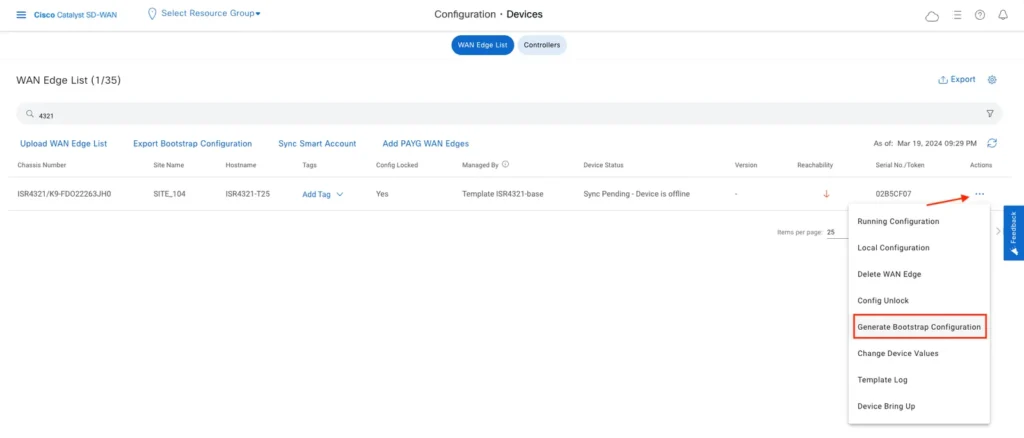
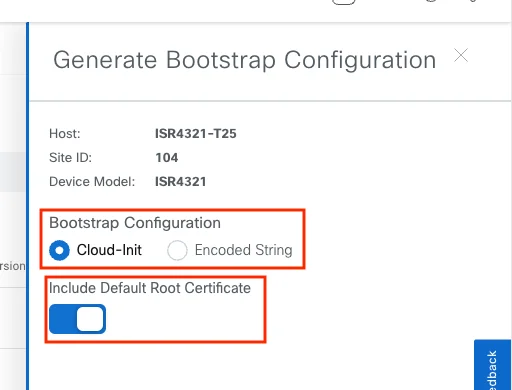
If you already have one or more comparable cEdge devices deployed in your SD-WAN environment, you can generate a complete bootstrap file directly from SD-WAN Manager. This file contains the device configuration required for onboarding and can serve as a useful reference when creating your own bootstrap configurations. To generate the file, follow the steps below.
Closing toughts
While Zero-Touch Provisioning and Plug-and-Play over USB may seem like a complex collection of files, formats, and bootstrapping processes, the underlying concept is surprisingly simple: provide the device with just enough information to establish connectivity and find its controller. Once you understand how files such as ciscosdwan.cfg are structured and processed, troubleshooting and customization become far less intimidating.
By demystifying the process, you gain greater control over device onboarding, making deployments more predictable, repeatable, and efficient. Whether you are deploying a single branch or hundreds of sites, understanding what happens behind the scenes of USB-based ZTP/PNP is a valuable skill for any Cisco Catalyst SD-WAN engineer.